

On Shopify, your product photographs will do most of the selling for you. Shoppers can’t touch the fabric or try the item on, so your images need to show shape, detail, and color clearly, and load quickly on a phone. Make this a standard for your team and use this checklist before you publish any apparel products.
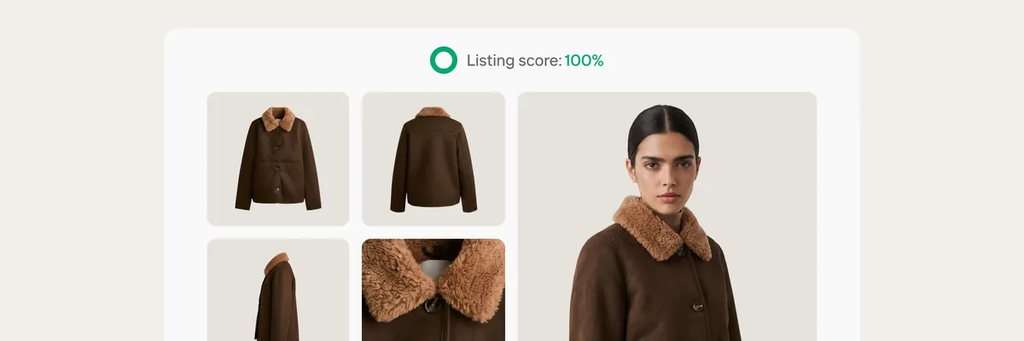
1. Image Set Planning
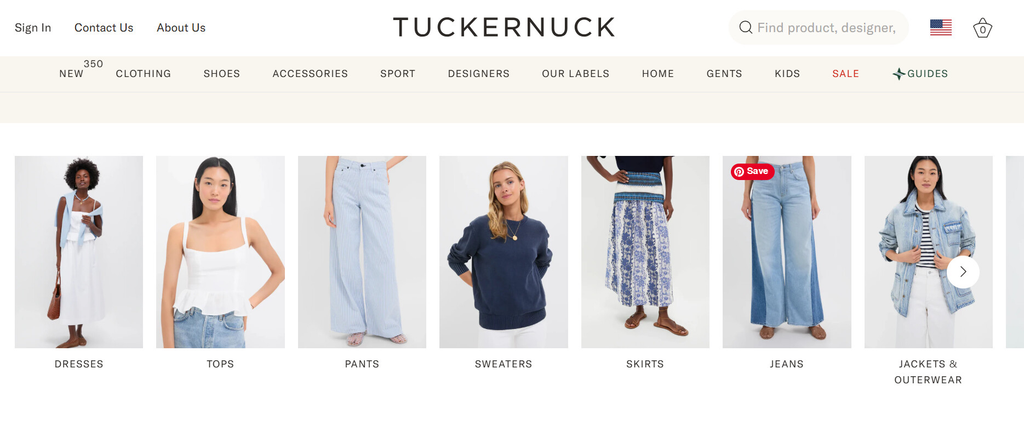
Aim for a consistent set for every product, so shoppers always find the same information in the same spot.
- Main image: the cleanest, most representative view (front, on model or ghost mannequin)
- Rear view
- Structured garments: side or three-quarter view
- Detail shots: collar, cuffs, pockets, zips, buttons, stiching
- Close up of fabric with texture and weave
- Inside view: lining, label or inside of collar
- Fit and styling seen in on-model or lifestyle photo.
- Size chart or fit guide (as an image or on the page)
You don’t need all items for all products, but establish your standard set and stick to it.
2. Select the Appropriate Style for Each Image
- Ghost mannequin shows shape and structure with a continuous catalog look.
- Refer to model photos for fit, length and drape.
- Flat lay is great for social content, accessories and necessities.
Many stores use ghost mannequin or a clean model shot as the main image, then add a few model or lifestyle images for fit.
3. Image Size & Technicalities
Shopify’s requirements are variable but here are the usually recommended targets. Check Shopify’s current Help Center before finalizing.
- Square images: the suggested size is 2048 by 2048 px to have decent zoom and quality.
- Consistent aspect ratio across all items (square 1:1 or a portrait ratio like 4:5), complementing your theme
- File size under the 20 MB upload limit, and ideally far smaller for fast loading
- Format: JPEG for most product photos; PNG only when you need transparency
- Zoom in without blur: High enough resolution
- Check your theme’s recommendations, since some themes crop or display images differently
4. Background and Framing
- Clean, simple background (white or light neutral is the safest and most versatile)
- Product centered with equal padding on all sides
- Same product size and position in the entire catalog
- No clutter, distracting props or obvious mannequin pieces.
- Soft, natural-looking shadow (or none) applied consistently
5. Styling and Garment Prep
- Garment steamed or ironed
- Lint, dust and loose threads taken out
- Collar, seams, hems, straight and symmetrical sleeves
- Fabric cut or fastened at back so the front is smooth
- Correct size of mannequin or model for garment
- Buttons, zips, and drawstrings neatly arranged
6. Lighting and Camera
- Soft, even light with no harsh shadows or hot spots
- Same lighting setup for the entire collection
- Camera on a tripod, same height, distance and angle every time
- Manual white balance or grey card for accurate color
- Sharp focus across the clothing, verified at 100% zoom
- If your workflow allows, shoot RAW
7. Editing and Retouching
- Clean cutout with smooth, natural edges (no halos or jagged lines)
- (For ghost mannequin) Mannequin, all clamps and supports removed
- Neck joint and inside areas blended naturally
- Wrinkles and dust reduced without erasing real fabric texture
- Color corrected to match the authentic garment
- No over-smoothing, so the product still looks real
- Check each image at full 100% zoom
8. Color Accuracy
One of the greatest causes of returns and unfavorable reviews is color mismatch.
- Image color compared against the actual garment
- Color name on the product page matches what the image shows
- Variant images (each color) shot and edited the same way
- Swatches, if used, reflect the true fabric color
9. Variants and Consistency
- Every color variant has its own image set
- Shopify matched variant images correctly, so the right image appears when a shopper selects a color
- Same angles, same order in variants
- Same style across the collection, so the store looks cohesive
10. File Optimization
- Images optimized to smaller file size with no noticeable loss of quality
- Target a minimal file size if possible, since many tips suggest keeping product photographs well below the maximum for speedier loading
- Tested on mobile, since most shoppers browse on phones
- No unnecessarily huge originals uploaded
11. Accessibility and SEO
- Descriptive file names, for example mens-navy-oxford-shirt-front.jpg instead of IMG_4821.jpg
- Alt text: Ghost mannequin, front view, men’s navy oxford shirt
- Alt text is for people, keywords only if it comes up naturally
- Images ordered logically in the product gallery
12. Order of Images in the Gallery
One common and effective order is:
- Main front image
- Back view
- Fit photo or on-model
- Detail photos (neck, cuffs, pockets)
- Fabric close-up
- Inside view or label
- Size chart
Put the most important information first, since many shoppers only look at the first few images.
13. Final Check Before Publishing
- Images load fast on mobile
- Zoom works and images stay sharp
- Crops right on product page, collection page and on mobile
- Colors look accurate on different screens
- Nothing is missing, mislabeled, or assigned to the wrong variant
- Image style matches the rest of the store
Need Help With the Editing Side?
Shooting is only half the work. Clean cutouts, neck joints, wrinkle cleanup, and color matching take time, especially across a large catalog. Our ghost mannequin service, background removal service, and color correction service can handle it in bulk, and you can start with a free trial of a few images.

Final Thoughts
A consistent, accurate, fast-loading set of photos builds trust and helps shoppers buy with confidence. Use this checklist for every clothing product, and your Shopify store will look more professional and be easier to manage as it grows.
Frequently Asked Questions (FAQ)
Q: What size should Shopify clothing images be?
2048 × 2048 pixels for square images is the commonly recommended size, with a file size under Shopify’s upload limit. Check your theme’s guidance too.
Q: Should I use JPEG or PNG?
JPEG is usually best for product photographs because of its good quality-to-size balance. Use PNG only if you need transparency.
Q: How many photos should each product have?
There’s no specific quantity, but a consistent collection of front, rear, detail, fabric, and fit pictures works well for apparel.
Q: Do I need a white background on Shopify?
No particular guideline, however a clean white or light neutral background is the most versatile and keeps the catalog consistent. It also makes it easier to reuse images on marketplaces.
Q: Should every color variant have its own photos?
Yes. Each color should have its own image set, assigned to the correct variant, so shoppers see the exact color they select.
Q: Does alt text matter?
Yes. It promotes accessibility and gives search engines context about the image.